












Your First 5 DJ Scratches: A Beginner's Guide

Learning your first beginner DJ scratches does not require a full vinyl rig. At $419 to $1,649 CAD, the controllers and turntables in this guide give new DJs a practical way to learn clean hand control, fader timing, and cue-point discipline. Start with the five motions below, keep your practice loops short, and focus on making each scratch sound intentional.
What You Need to Learn Beginner DJ Scratches
Scratch practice comes down to three things: a cue sound with a clear attack, a surface you can move accurately, and a crossfader that you can open and close on purpose. Use a short vocal hit, horn stab, or drum sound. Long pads and busy musical phrases make it harder to hear your timing mistakes.
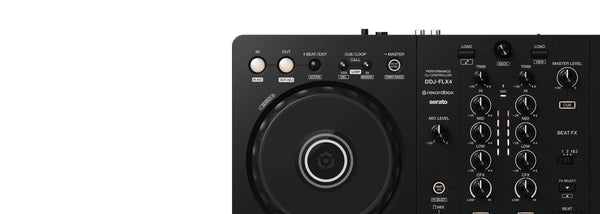
A controller is the simplest route if you are learning at home. The Pioneer DJ DDJ-REV1 gives you a compact battle-style layout and Serato DJ Lite, while the DDJ-REV5 adds a metal MAGVEL FADER and more advanced performance tools. You can learn all five scratches here without buying records or a separate mixer.
A direct-drive turntable changes the setup. A turntable still needs a mixer and a record or a DVS setup. The PLX-500 can work with a DVS-capable mixer, control vinyl, and rekordbox for digital-file scratching. The Reloop RP-5000 MK4 is a manual turntable, so plan your cartridge, headshell, mixer, and music source before you buy.
Your First Five DJ Scratches
1. Baby scratch
The baby scratch is the foundation. Leave the crossfader open, place your fingertips on the jog wheel or record, and move the sound forward and backward in an even rhythm. Do not touch the fader yet. Start with a short forward pull, then return the sound to its starting point. The goal is consistency: equal forward and backward movements, no rushing, and no accidental pauses.
2. Forward scratch
Start with the crossfader closed so no sound is heard. Move the sound backward to your cue point silently. As you push the sound forward, open the fader and let the sound play. Close the fader at the end of the forward movement. Pull the sound back silently, then repeat. You are hearing only the forward motion.
3. Backward scratch
The backward scratch reverses that idea. Begin with the sound sitting at the cue point and the fader closed. Push the sound forward silently. Open the fader as you pull the sound backward, then close it before you return to the cue point. You are hearing only the backward movement. Keep the return motion smooth, since uneven speed makes the phrase wobble.
4. Chirp scratch
A chirp is a baby scratch with a quick fader cut at the start of each direction. Open the fader just after the record or jog begins moving forward, then close it before that forward movement ends. On the pullback, open just after you start moving backward and close before the motion finishes. The silent edges create the short, chirping sound. Practice it slowly first. Fast chirps with loose timing sound messy fast.
5. Transformer scratch
The transformer is a fader cut performed over a baby scratch. Keep the sound moving forward and backward as you would for a baby scratch, but repeatedly tap the crossfader open and closed during each motion. Your hand on the platter or jog keeps the movement steady. Your fader hand creates the rhythmic chopping. Begin with one clean cut per forward motion, then add cuts only after the first pattern is solid.
Our Picks for Beginner DJ Scratches


Best First Controller for Scratching: Pioneer DJ DDJ-REV1
The Pioneer DJ DDJ-REV1 is $419 CAD for new DJs who want to learn their first scratches without building a turntable setup. It gives you a two-deck, battle-style workspace for learning baby scratches, forward scratches, chirps, and basic transformer cuts with Serato DJ Lite included.
The layout matters more than flashy features here. Its horizontal tempo sliders mirror a battle-position turntable setup, while the performance pads and effects levers sit in the mixer area where your hands can reach them during practice. The larger jog wheels give you more room to control short, repeatable movements.
Tracking Scratch is useful while you are still learning cue control. When you move the jog backward, playback snaps back to the cue point, helping you reset quickly for another attempt. At this price, the REV1 is a sensible starting point for open-format DJs and aspiring turntablists who need focused practice rather than extra complexity.
Best Turntable for Vinyl Scratch Practice: Pioneer DJ PLX-500
The Pioneer DJ PLX-500-K is $569 CAD for DJs who want to learn beginner DJ scratches on a direct-drive turntable and start working with vinyl or a DVS setup. It handles the physical record movement behind a baby scratch, chirp, or transformer, but it is not a complete scratch rig on its own.
You still need a mixer and a record or DVS setup. For digital-file scratching, the PLX-500 can pair with a DVS-capable mixer, RB-VS1-K Control Vinyl, and rekordbox. Its included headshell, cartridge, and stylus make it a more direct route into record practice than a turntable that requires those parts separately.
The phono/line output switch also gives you flexibility for listening and routing, while USB-B lets you record vinyl to a PC or Mac through rekordbox. At $569 CAD, it is a practical entry point if your goal is real record handling and you understand the extra gear a turntable setup requires.
Best for Serious Turntable Practice: Reloop RP-5000 MK4
The Reloop RP-5000 MK4 is $849 CAD for DJs building a more serious direct-drive scratch setup and looking for a turntable designed for regular practice or club use. It gives you the manual control needed to refine scratch motions, with reverse and multiple pitch ranges available for broader DJ work.
This is the pricier turntable choice, and part of that cost is aimed at DJs who want a more substantial practice tool. The redesigned damped chassis, clickless pitch fader, hydraulic-lift S-shaped tonearm, and integrated LED stylus light are practical touches for frequent use. Reverse can also add another layer to your practice once basic forward and backward control is clean.
A mixer and a record or DVS setup are required for scratching. Headshell and cartridge are sold separately, so budget for the system you want to use. The RP-5000 MK4 suits DJs committed to developing turntable technique through regular practice.
Best Controller for Growing Scratch Skills: Pioneer DJ DDJ-REV5
The Pioneer DJ DDJ-REV5 is $1,649 CAD for DJs who want to learn beginner DJ scratches on a larger battle-style controller, then move into more demanding routines and performance ideas. It gives you Serato DJ Pro and rekordbox licenses, along with a dedicated scratch-oriented control layout.
The key upgrade for scratch practice is the metal MAGVEL FADER. Its curve control lets you move between gradual and abrupt cuts, which matters as you progress from forward and backward scratches into chirps and transformer patterns. The fader reversal switch also supports transform and slip-style techniques. Its Jog Feel adjustment lets you tailor the jog response to your preference.
Dedicated stem controls, four-deck operation, Auto BPM Transition, and Piano Play create room for broader sets once your fundamentals are in place. That is a lot of controller for a first week of practice. Still, it earns its price for DJs who know they will keep developing beyond basic scratch drills rather than replacing an entry-level controller later.
Scratch Practice Setup Tips
Pick one short sound and use it for every drill. A vocal syllable or sharp horn hit makes it easy to hear each movement and fader cut. Keep your monitoring level moderate, especially while you are repeating the same phrase for several minutes.
Work in short blocks. Spend five minutes on baby scratches with the fader open, then move to forward and backward scratches. Do not jump to fast chirps before your silent resets are clean. Record a quick practice pass if you can. Timing issues are often easier to hear after you stop moving.
On a turntable, make sure you have the full chain before practice: turntable, mixer, and a record or DVS setup. On a controller, set a cue point at the start of your scratch sound and return to it between attempts. Clean repetition beats random freestyle practice.
Beginner DJ Scratches FAQ
Which scratch should I learn first?
Learn the baby scratch first. It teaches the forward and backward hand motion without adding crossfader timing. Once both directions sound even, move to forward and backward scratches, then chirps and transformers.
Can I learn scratching on a DJ controller?
Yes. A controller such as the Pioneer DJ DDJ-REV1 or DDJ-REV5 lets you practice scratch movements and crossfader technique without buying a separate turntable and mixer setup. Start with simple cue sounds and repeat each motion slowly.
Do I need a mixer to scratch on a turntable?
Yes. A turntable needs a mixer and a record or DVS setup for scratching. The turntable controls the record movement, while the mixer crossfader creates the cuts used in forward scratches, chirps, and transformer patterns.


