













How to Set Up the Pioneer DDJ-FLX4 with Rekordbox and Serato

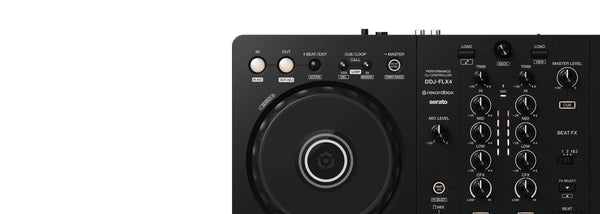
The Pioneer DJ DDJ-FLX4 is $449 CAD for DJs learning to mix at home, practising sets, or building a portable rig around a computer or mobile device. It gives you one controller that can run rekordbox or Serato, then puts the essential jobs in reach: load music, cue it in headphones, match tracks, and make clean transitions. This ddj-flx4 rekordbox serato setup guide covers the practical first steps, plus the headphones and software that make sense alongside it.
What You Need for a DDJ-FLX4 Setup
Start by deciding which DJ software you want to learn. The DDJ-FLX4 works with rekordbox and Serato DJ Lite, which is free. It also works with Serato DJ Pro, though that requires a separate license. Pick one platform for your early sessions instead of switching back and forth. You will learn faster once the library, waveforms, cue points, and performance workflow feel familiar.
For a wired setup, connect the controller to your PC, Mac, or compatible mobile device by USB-C. The FLX4 can run on USB bus power with a PC or Mac, while mobile setups can use its second USB-C port for external power. Bluetooth is also supported with rekordbox for iOS or Android and djay. For monitoring, use headphones connected directly to the controller so you can preview the next track before the crowd hears it. Closed-back DJ headphones matter here because speaker sound and room noise can make beatmatching difficult.
Finally, keep your first sessions simple. Load one track on each deck, set a cue point, and focus on timing your transition. Effects, loops, streaming services, and performance pads can wait until you have a reliable basic mix.
Our Picks for a DDJ-FLX4 Setup


Best Controller for Rekordbox and Serato: Pioneer DJ DDJ-FLX4
The Pioneer DJ DDJ-FLX4 is $449 CAD for new DJs and experienced selectors who need one compact controller to practise, record ideas, and play sets with rekordbox or Serato. Its main job is straightforward: give you hands-on control of two decks and a familiar mixer layout without forcing you into one software platform.
For a wired setup, connect it to a PC, Mac, iPhone, iPad, or Android device using USB-C, then choose it as your audio device inside your DJ software. Bluetooth is also available with rekordbox for iOS or Android and djay. The built-in soundcard means you do not need a separate audio interface for standard controller use. There is also a 3.5 mm headphone output for cueing and RCA master outputs for sending your mix to speakers.
The layout is useful because it keeps the core controls obvious. You get gain, 3-band EQ, channel faders, a crossfader, jog wheels, tempo sliders, loop controls, and pads for Hot Cues, Pad FX, Beat Jump, and Sampler. At $449 CAD, it is a sensible buy if you want to learn a workflow that still feels close to Pioneer DJ's larger performance gear.
Best Headphones for Cueing: Sennheiser HD 25
The Sennheiser HD 25 is $199 CAD for DJs who need to hear the next track clearly while the current track is playing through speakers. Its job in a DDJ-FLX4 setup is cue monitoring, helping you find your mix-in point, check phrasing, and line up tracks before bringing them into the master mix.
The closed on-ear design offers strong passive isolation, which matters in a loud room or near studio monitors. The rotating ear cup is equally practical. Flip one side back for single-ear cueing, keeping one ear on the room and the other on the incoming deck. That is still one of the quickest ways to catch a drifting beat or an intro that starts earlier than expected.
Its detachable cable and field-replaceable parts are a real value point for working DJs. You can keep the headphones in service instead of treating them as disposable gear. At $199 CAD, the HD 25 costs more than entry-level headphones, but it earns that price through isolation, low weight, and a cueing design that has stayed relevant for years.
Best Serato Upgrade: Serato DJ Pro
The Serato DJ Pro is $415 CAD for DJs who want to run their DDJ-FLX4 with Serato's full professional software workflow. Its job is to give you the expanded Serato environment for performance, music organisation, effects, streaming, and creative mixing tools. The DDJ-FLX4 works with Serato DJ Lite for free, while Serato DJ Pro requires this separate license.
This is the right purchase if Serato is the platform you plan to commit to, especially if you want features such as Serato Stems. Stems can isolate vocals, melody, bass, or drums, opening up practical mashup ideas and cleaner transitions between tracks that would otherwise clash.
At $415 CAD, Serato DJ Pro is a serious addition beside a $449 controller. Do not buy it simply because you are setting up the FLX4 for the first time. Start with Serato DJ Lite if it covers your needs. Buy Pro once you know you want its deeper performance tools and want Serato to be your long-term DJ platform.
How to Set Up the DDJ-FLX4
- Install rekordbox or Serato. Choose the software you want to use for your first sessions. Serato DJ Lite is free, while Serato DJ Pro needs its own license.
- Connect the controller. For a wired setup, use the included USB-C cable to connect the DDJ-FLX4 to your PC, Mac, or compatible mobile device. Bluetooth can also be used with rekordbox for iOS or Android and djay. For mobile wired use, connect external power to the second USB-C port when needed.
- Select the DDJ-FLX4 as the audio device. Inside rekordbox or Serato, choose the FLX4 for audio so the controller handles your master output and headphone monitoring.
- Load music onto both decks. Put one track on each deck, then use the deck controls to start, pause, cue, and adjust tempo. Begin with tracks that have clear intros and similar tempos.
- Connect your HD 25 headphones and cue the next deck. Plug the headphones into the FLX4's headphone output. Listen to the incoming track before raising its channel fader, then bring it into the mix once the timing feels right.
Keep your first practice session focused on one transition at a time. Set cue points near the beginning of each track, count phrases, and use the jog wheels or tempo sliders to correct timing. Smart Fader and Smart CFX can be useful later, but clean basic transitions will do more for your DJing than piling on effects too early.
DDJ-FLX4 Setup FAQ
Does the DDJ-FLX4 work with rekordbox and Serato?
Yes. The Pioneer DJ DDJ-FLX4 works with rekordbox, Serato DJ Lite, and Serato DJ Pro. It can also work with djay and Traktor Play. For a first setup, choose rekordbox or one Serato version and spend time learning that platform before adding another workflow.
Do I need Serato DJ Pro for the DDJ-FLX4?
No. The DDJ-FLX4 works with Serato DJ Lite, which is free. Serato DJ Pro is a separate $415 CAD license for DJs who want its professional feature set, including Serato Stems and additional performance tools.
How do I hear the next track in my headphones on the DDJ-FLX4?
Connect headphones to the controller's 3.5 mm headphone output, select the DDJ-FLX4 as your software's audio device, then cue the deck you want to preview. The Sennheiser HD 25 is well suited to this job because its closed design helps isolate the cue signal from the room.


