













How to Set Up the Pioneer DDJ-FLX4 with rekordbox and Serato

The Pioneer DJ DDJ-FLX4 works with rekordbox and Serato DJ Lite on a laptop, and with rekordbox on a phone or tablet. It needs no driver on Windows or Mac. This guide gets it connected, playing through your speakers and cueing in your headphones.
How to Set Up the DDJ-FLX4
- Choose your DJ software. Install rekordbox if you want to use rekordbox, or download Serato DJ Lite free from Serato's website if you want to use Serato.
- Connect the DDJ-FLX4 to your computer by USB. The Pioneer DJ DDJ-FLX4 needs no driver installation on Windows or Mac.
- Open rekordbox or Serato DJ Lite. rekordbox recognizes the controller after connection, and Serato DJ Lite unlocks while the DDJ-FLX4 is connected.
- Connect your speakers to the MASTER output. The controller sends your main mix through its MASTER output to your speakers.
- Connect headphones to the headphone output. Use headphones to cue and prepare the next track while another track plays through your speakers.
- Load music onto both decks and test the setup. Play a track and confirm that it reaches your speakers, then turn on the deck cue for the track you want to hear in your headphones.
- Use rekordbox mobile with a phone or tablet if needed. rekordbox for iOS and Android connects by USB cable or Bluetooth.
- Provide external power for Bluetooth mobile use. Bluetooth requires power from a USB power adapter or mobile battery, and a USB cable is the better choice for lower delay.
Common DDJ-FLX4 Setup Problems
Why is sound coming from my laptop speakers?
Connect your speakers to the DDJ-FLX4's MASTER output. The controller sends your main mix through that output.
Why can’t I hear a track in my headphones?
Turn on the cue button for the deck you want to monitor. Headphones let you prepare that deck before you raise its channel fader in the main mix.
Why is Serato DJ Lite still locked?
Check that the USB cable is connected to the correct port on the DDJ-FLX4. Serato DJ Lite unlocks while the controller is connected.
Recommended DDJ-FLX4 Gear


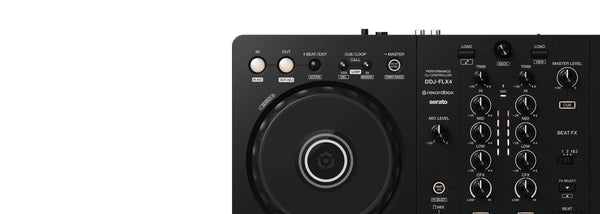
Pioneer DJ DDJ-FLX4 2-Channel DJ Controller
The Pioneer DJ DDJ-FLX4 is $449 CAD. It is for beginner DJs who need a compact controller for rekordbox or Serato DJ Lite, with a main speaker output and headphone cueing for learning transitions. It is the controller covered in this setup guide.
The DDJ-FLX4 works with rekordbox, Serato DJ Lite, Serato DJ Pro, djay, and Traktor Play. Serato DJ Lite is free, while Serato DJ Pro requires a license. The controller has two USB-C ports, one for a computer or mobile device and one for external power during iOS or Android use. It can run from USB power when connected to a PC or Mac.
Once your connections are working, the DDJ-FLX4 gives you jog wheels, tempo sliders, channel faders, a crossfader, 3-band EQ, performance pads, Smart Fader, Smart CFX, and Beat FX. It also supports rekordbox streaming through TIDAL, Beatport Streaming, Beatsource Streaming, and SoundCloud Go+.
Pioneer DJ HDJ-CUE1 Wired DJ Monitor Headphones
The Pioneer DJ HDJ-CUE1 is $119 CAD. It is for new DJs who need headphones for cueing tracks on the DDJ-FLX4 before those tracks enter the main mix. A proper headphone cue setup is one of the first things to learn after your speakers are connected.
These closed-back DJ headphones use swivelling ear cups for single-ear monitoring, which is useful while you listen to the room with one ear and your cue track with the other. They fold flat for travel and include a detachable coiled cable. Their 3.5 mm plug includes a screw-on 6.3 mm adapter.
Decksaver Cover for Pioneer DJ DDJ-FLX4
The Decksaver Cover for Pioneer DJ DDJ-FLX4 is $74 CAD. It is for DDJ-FLX4 owners who need to keep their controller protected between practice sessions, at home, or during transport. It helps shield the controls while allowing cables to stay connected.
This smoked-clear cover is precision-molded from polycarbonate for the DDJ-FLX4. It protects against dust, liquid spills, and accidental impacts, while preserving visibility of the controller controls. It also fits into flight cases and travel bags.
Glorious Session Cube XL Laptop Stand
The Glorious Session Cube XL Laptop Stand is $89 CAD. It is for DDJ-FLX4 users who own the Glorious Session Cube XL workstation and need to raise a laptop above their DJ system. A higher laptop position can make track browsing and software control more comfortable during practice.
This glass shelf mounts to the Glorious Session Cube XL with two aluminium brackets. Mounting hardware is included. It is designed specifically for the Session Cube XL workstation.
rekordbox, Serato, and Mobile Setup
rekordbox recognizes the DDJ-FLX4 after you connect it. The controller can also access music through supported rekordbox streaming services, including TIDAL, Beatport Streaming, Beatsource Streaming, and SoundCloud Go+.
Serato DJ Lite is free and unlocks while the DDJ-FLX4 is connected. Serato DJ Pro is available as a paid upgrade. Keep the controller connected while using Serato DJ Lite.
For rekordbox on iOS or Android, connect by USB cable or Bluetooth. Bluetooth needs external power through a USB power adapter or mobile battery, and USB gives you lower delay for cueing and beatmatching.


